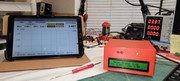
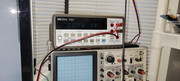
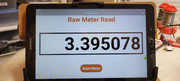
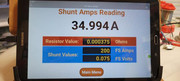
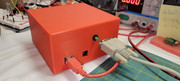
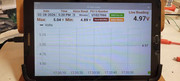
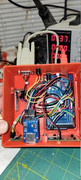
This is a project to read data from the HP/Agilent 34401A multimeter and perform 3 main functions:
1) Display the raw meter data, because my meter's display can be intermittent.
2) Display current shunt readings in actual amps.
3) Graph and record meter readings as part of my burn-in process after repairs and calibrations.
Getting the data from this meter is a real pain (for me) via SCPI, so when I found that GPIB address 31 was a constant stream of raw meter data on the RS232 line, I was intrigued. I figured out how to read this data on my PC. Then a real-world problem came to mind and I thought I could put the two together.
The real-world problem was reading shunts with non-decade meter measurements. For example, reading a shunt that's 100 amps and 100mV full-scale is no issue... I just move the decimal point in my head and I can easily read what the actual amps are. But, I have shunts like 200A at 75mV full-scale and 5A at 75mV. Now the readings in mV requires a calculator to get the real amps. Since I do calibrations on large power supplies (like an Elgar TW5250-3, an AMREL SPSX, etc.) that can require ~500 calibration setpoints, and multiple attempts for each one to zero-in on the correct values, going to the calculator for every current reading was costing days of labor time. Since this issue is just a matter of math, why not let an Arduino handle the math... simple enough. Stuff the meter data into an Arduino, do some math and display it on an LCD... done! But, I could not leave well enough alone. Enter my tablet for a graphical interface and RemoteXY.
I first attempted to use BlueTooth Electronics from Keuwl because it was free and I really liked the graphic options. After spending a month on the project, I became troubled with Keuwl's program for one reason... the data was intermittently corrupted and therefor would crash the graphic interface. Moreover was the meter data would also be corrupted. I tried everything to fix the issue, but ultimately lost hope in ever getting something I could use professionally. Then I found RemoteXY. Disappointed (at first) in having to start over again and not having some of the features I had grown to like, I tried RemoteXY to see if it was stable and free from data corruptions. It turns out it's stable! All along, I was thinking I had hardware/software issues on my end that were causing the data corruption. Turns out it was Kewul's BlueTooth Electronics, not me. Relieved that the data could now be used without question, I started on this journey with RemoteXY.
I'm still in the process of sorting everything out, but I have to say, I really do like RemoteXY, even if I don't fully understand everything it offers. I'm willing to learn and it's paying off. I now have a project that saves my time and money in the office and it's a hit with the rest of the office. It spends more time on other peoples desks than it does mine. It makes me happy that it's liked so much. Oh, I guess I forgot to mention... I'm an Engineering Technician repairing large industrial power supplies. Calibrations is only part of what I do. This RemoteXY and Arduino programming are a hobby for me, not my profession.
Thank you for letting me share this project,
Gary
--